Virtual Try-On vs Size Charts, Fit Notes and Size Recommendation Tools

Virtual Try-On vs Size Charts, Fit Notes and Size Recommendation Tools
Virtual try-on and size recommendation tools solve different problems. A size chart, a set of fit notes, or a size-recommendation engine each answer the question “which size should I order?” with a number. Virtual try-on answers a different question: what will this actually look like on me? and shows you an image. Comparing them head-to-head is the wrong frame. Sizing uncertainty isn't fully resolved until a shopper has both an answer and a way to check it.
Two different questions
Every sizing tool on a product page is ultimately trying to close the same gap. A shopper can't touch the fabric or try the garment on before buying it. But the tools available to close that gap fall into two categories.
The first one is size recommendation: taking whatever is known about the shopper (their stated size, their measurements, or other shoppers' reported experience) and converting it into a decision. Order a Medium, order a size up, order this specific size in this specific style. A size chart does this in its plainest form. A size-recommendation engine does it with more precision. Fit notes do it indirectly, by giving shoppers someone else's data point to reason from.
The second one is visualizing: showing the shopper what the garment actually looks like once it's on a body with the users dimensions, so the decision can be checked rather than just trusted. This is a fundamentally different output, an image or video instead of a number, and it's the job none of the recommendation-side tools were built to do.
The two get conflated often. A size-recommendation tool that outputs “you're a size 10” hasn't shown the shopper anything about how that size 10 will sit on their shoulders, or whether the cut works for their proportions. A virtual try-on that isn't grounded in an actual measurement-based recommendation is showing a picture without confirming it's even the right size to be looking at. Both problems are solved by treating recommend and visualize as two stages of the same decision, not by picking one tool and hoping it covers both jobs.
What a size chart does
A size chart converts a brand's own grading into a table: chest, waist and hip measurements mapped to a letter or number. It's the oldest and most universal sizing tool, and it has a specific, narrow job: telling a shopper which size corresponds to which body measurement range, according to that brand's own pattern.
Its limitation isn't that it's inaccurate; it assumes the shopper already knows their own measurements accurately, is willing to take them, and can correctly interpret how their body compares to a chart built around averages and ranges. None of that produces an image. A shopper who follows the size chart perfectly still has no idea how the finished garment will drape on their specific proportions, or whether a “true to size” fit for a straight-cut brand pattern will read the same way it did on the last brand they shopped from.
What fit notes do
Fit notes come in two forms, and shoppers run into both. Brand-written fit notes sit alongside the size chart: a line noting the model's height and weight and the size they're wearing in the product photos, or a merchandiser's note that a style “runs small” or “has a relaxed fit through the waist.” Customer-submitted fit notes are the qualitative layer of a review: “runs small, order up,” “true to size,” “the sleeves are longer than expected.” Both are attempts to give a shopper a data point beyond the size chart's ranges.
Fit notes are useful precisely because they capture something a size chart can't: real experience of how a specific style fits, rather than how it was designed to fit. But they are limited by two things. They're still text, not an image, so a shopper still must imagine the result. And they're compared to somebody else's body. A five-star review that says “true to size” is only useful to a shopper who shares enough of that reviewer's proportions for the comment to transfer, which a shopper reading a review has no reliable way to judge.
What a size-recommendation tool does
A size-recommendation tool, sometimes marketed as a size finder or a size advisor, is the more precise version of the same job a size chart does: measurement-based sizing, in effect a form of body measurement sizing, that converts a shopper's own body data, self-reported, scanned, or inferred from past purchases, into a specific size recommendation for a specific style, sometimes with a fit prediction layer that adjusts for how a style's cut runs relative to the brand's standard grading. Done well, this is significantly more accurate than a static size chart, because it's checking the shopper's actual measurements against the garment's actual pattern rather than asking the shopper to self-classify against a generic range.
What it still doesn't do is show the shopper anything. The output of a size-recommendation tool, however accurate, is a number, an advisor's answer, not a visualization. A shopper still must trust that number blind, the same way they'd have to trust a size chart, just with better odds that the number is correct. For a shopper weighing whether a cut suits them, or whether a recommended size will look the way they want it to, a correct number isn't the same as size confidence.
Where virtual try-on fits
Virtual try-on is built to do the one job none of the tools above can: show the garment on a body, in the size being considered, so the shopper can see the result instead of inferring it. That's a different capability. It turns “which size” into a question with a visible answer rather than a trusted one.
But virtual try-on solves that problem well only when it's connected to a real measurement basis. A try-on experience that drapes a garment onto a generic or self-selected avatar can still show something useful, but it's answering “what does this size look like on a body roughly my shape,” not “what does this look like on my body, in the size that actually fits me.” Those are different levels of confidence, and the gap between them is exactly where a size-recommendation engine is useful, not as a competing tool, but as the input that tells virtual try-on which size is actually worth visualizing first.
Why running both on one body model is different from bolting two vendors together
This is where the two jobs come together in practice. Esenca Sizing extracts a shopper's body measurements and builds a 3D avatar representing the shopper’s body with high fidelity and uses that same measurement data to recommend a size for a given garment, the “which size” answer, generated from the shopper's actual body rather than a self-reported guess. Vesto3D then takes that same avatar and that same recommended size and shows the shopper exactly what it looks like on them, with the option to compare a different size against it visually, side by side, before deciding.
That sequence matters because the alternative, a size-recommendation tool from one vendor and a virtual try-on from another, depends on two separate systems agreeing about the shopper's body without ever actually checking. If the try-on tool's avatar was built from a different measurement capture, a different set of assumptions about body shape, or simply a different underlying body model than the one that produced the size recommendation, there's no guarantee the two are describing the same body. The shopper could be shown a photoreal image of a size that isn't the one the recommendation engine calculated for them, or a recommendation and a visualization that quietly disagree with each other. And neither system would know, because neither has visibility in the other's data. This is the default outcome of stitching together two vendors that were never designed to share a body model.
Running recommend and visualize off one shared body model closes that gap automatically. The size a shopper is shown fitting well is the same size the measurements support, because it's the same measurements and the same avatar doing both jobs, not two separate approximations of the shopper's body being reconciled after the fact.
So which one actually "works better"?
The two sides are judged on different things. A recommendation tool, whether that's a static size chart or a measurement-based engine, is judged on one question: is the size it gives correct? Correct there has a narrow meaning: the size that fits the shopper's measured body. That is an objective question, and a good recommender answers it well. What it can't answer is how the shopper wants the garment to sit. Virtual try-on picks up there. Without it, “the tool says Medium” is the end of the decision, and the shopper either trusts it or doesn't. With a visual check on that same Medium, the shopper sees what that size does on their own body, and can decide whether they want it that way. Someone who likes a closer cut can put the Small beside it and look at the difference rather than imagine it. The recommendation says what fits; the shopper chooses how it should sit, with both options in front of them instead of in their head.
So, the useful comparison isn't virtual try-on against a size recommendation tool. It's the recommendation stage against the confirmation stage. A size chart, a set of fit notes or a size-recommendation engine is the input; virtual try-on is where that input gets checked, and where a shopper who wants a different fit can choose one on sight. Neither does the other's job. A brand that swaps its size recommendation tool for virtual try-on has removed a cheap reference shoppers still use; a brand that adds try-on with no measurement-based recommendation behind it has a visualizer with no informed starting size to show or a high-fidelity body representation of the shopper’s body.
What does this mean for sizing uncertainty specifically
Sizing uncertainty is the reason a shopper orders two sizes “just in case” or abandons a cart rather than guess. It comes from not being able to check a decision before committing to it. A size chart and a size-recommendation tool both try to reduce that uncertainty by making the initial guess more informed, which helps, but from a shopper’s perspective, a more informed guess is still a guess until it's checked visually. Virtual try-on is what makes it checkable: instead of ordering a size and finding out three days later whether the recommendation was right (according to the shopper’s subjective preference), a shopper sees the result before the order is placed. That is how virtual try-on reduces sizing uncertainty. It doesn’t replace the recommendation, but it increases the confidence in the size recommended by visualization, while at the same time allowing the user to easily choose adjacent sizes according to their own subjective preference.
How the pieces compare
The table below lines up what each tool answers, what form the answer takes, and whether a shopper can check it before buying.
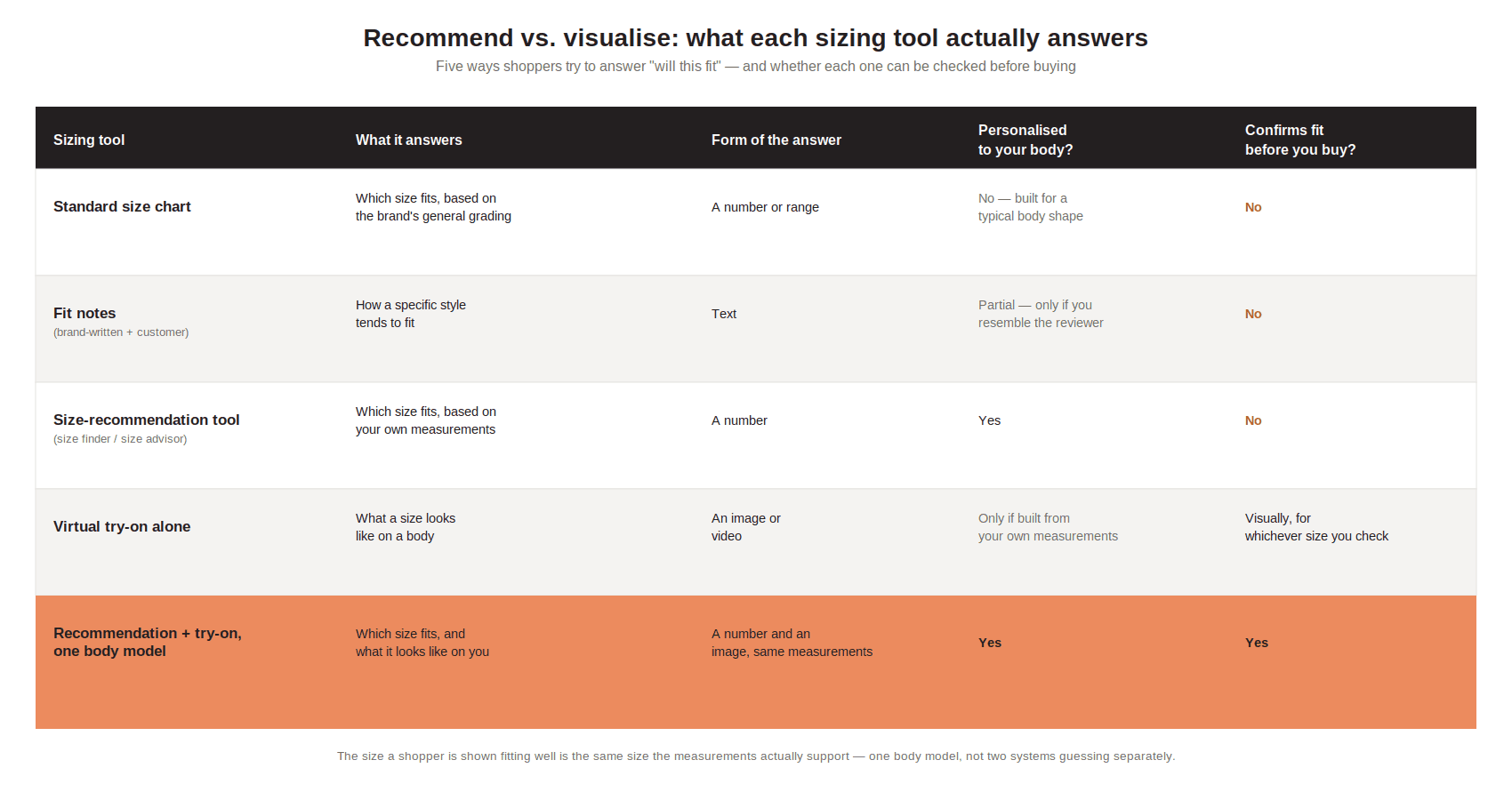
Recommend vs. visualize — what each sizing tool answers, and whether it can be checked before buying.
What does this mean in practice
None of this means size recommendation tools are unnecessary, they're very useful, low-cost signals, and plenty of shoppers will keep using them. This is a sequencing question, not a replacement one.
For a team already running a size chart and fit notes, the gap to close is the visual one: shoppers are still being asked to trust a number or a stranger's review without any way to check it against their own body. Adding a measurement-based recommendation and a try-on layer on top doesn't mean removing what's already on the page. The chart and the reviews stay and become the low-cost fallback for shoppers who skip the interactive tools.
For a team already running a size-recommendation tool without any visual layer, the gap is the opposite one: shoppers are getting a more accurate number than a static chart would give them, with no way to confirm what that number looks like on their body before they commit. That's a case for adding the visualization step, not for distrusting the recommendation engine already in place. The fix is to show the result of the recommendation, not to replace how the recommendation is calculated.
For a team building sizing from scratch, the order is obvious, once recommend and visualize are understood as two stages of one decision rather than competing options: get the measurement-based recommendation right first, since it decides which size is worth showing, then add the visual confirmation on top of it, ideally from the same body model, so the two stages describe the same body rather than two independent approximations of it.
A size-recommendation tool without a way to visualize its answer gives the shopper nothing to check it against. A virtual try-on without a real recommendation behind it is answering “what does this look like” for a size that was never actually confirmed to fit on a body representation different from the shopper’s body. Put a measurement-based recommendation and a visual confirmation on the same body model, and a shopper gets an answer to both questions at once (which size, and what it looks like) instead of matching up two tools by hand.
That's the actual case for treating visualize vs recommend as two stages of one connected decision rather than two competing tools: not that virtual try-on replaces a fit guide, but that a fit guide without a visual check, and a visual check without a real size behind it, are both half of the same job. See a recommended size and its visual fit side by side on your own catalog, and judge for yourself whether the two stages agree.
Other articles
View All Articles